PennyPincher
Your personal deal hunter

The Problem
The Solution
Tech Stack
Challenges & Learnings
Visuals

Dashboard Screenshot

Product List Screenshot
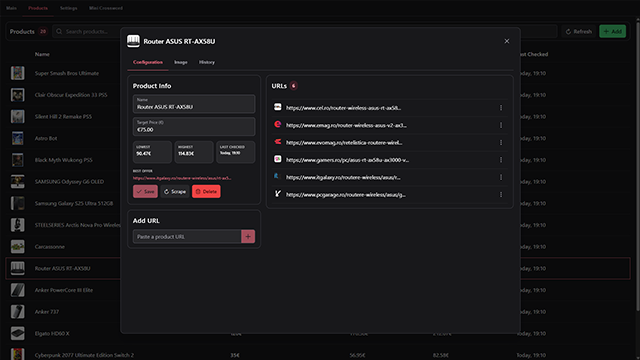
Product Detail Screenshot

Settings Screenshot
Technical Details
Web Scraping
I built a Puppeteer-based scraper that adapts to messy site structures and dodges common anti-bot measures. Scraping is parallelized, with three workers running by default; a sweet spot I found between performance and system load. Users can adjust the number of workers if they want faster scans or lighter resource usage.
Architecture
The app is split into layers: the Vue+Electron UI talks to a Node.js + Express backend through REST APIs. That backend is managed by a small C# WPF helper app I built, which makes sure Node and all required modules are installed, and starts the server silently on Windows startup so scraping always runs in the background. I chose this setup for flexibility: the UI can evolve independently, and the backend can eventually even be hosted remotely if needed.
Desktop Application
On the front end, Electron provides a smooth cross-platform desktop experience. It combines the Vue-powered interface with Node.js under the hood, while also spinning up a small local server so you can access the UI from your phone on the same network; handy if you want to check prices from the couch.
Data & Caching
For storage, I chose SQLite: lightweight, fast, and perfect for a local-first app. It keeps user data private on their machine while making lookups and alerts instant. I also used Electron's storage for caching favicons and product images, so the app looks polished without wasting bandwidth on repeated downloads.
Notifications
Price alerts show up as native desktop notifications, and I added Telegram support for anyone who wants updates on the go. It's surprisingly satisfying to get a ping that a tracked product finally dropped in price.
Outcome & Impact
My Role
I designed and developed PennyPincher end-to-end, from concept to deployment, including: research, development, testing, and iterative improvements.